Showing posts with label mobile. Show all posts

Friday, October 01, 2010

Windows Phone 7 – my first app :-)

I’m working on a little application for the new Windows Phone 7 operating system.

The app, TimeToRead, is a client for Read It Later (http://readitlaterlist.com). Its goal is to let you access your “reading list” when you have time… to read something you pinned earlier.

It will provide you the lists of read / unread / all articles; tapping an article you can read it directly from the web version or choose to read only the “text version” (this is a service provided by readitlaterlist.com site), mark as read an article and finally tweet about the article on your Twitter account.

The app uses some libraries like json.net and Hammock for REST in order to access the external sites. It’s not very complicated, still I think that it can be useful – let’s see.

A few screenshots:

image

image

image

and here’s a little video I posted on Msdn Italy’s Facebook page – it’s not of the latest release, but it gives an idea.

Ciao!

Monday, December 15, 2008

A Mobile Wikipedia

I missed completely this, but Wikipedia officially launched a mobile version, at http://mobile.wikipedia.org/

For me this is a great news, as the “standard” Wikipedia interface is difficult to handle on a mobile device, even with a good browser as SkyFire is (non-us residents read this). And I often look for info on Wikipedia, both english an italian versions, on my mobile device.

Tried it, and it’s good: fast and well-organized, all internal links point to “mobilized” versions of the pages, I like this.

Wednesday, November 05, 2008

Windows Mobile: Messaging not working, a solution

Sometimes in WM5 (but also in WM6, I’m sure) the messaging system stops working. You cannot even open the inbox, or send an SMS, nothing.

If you find yourself in this situation… try this:

- open your storage card file system
- look for a folder named Inbox.mst12345678 (the number here may change) 
- delete it and reboot your device.

This should work, hope this helps!

Tuesday, July 29, 2008

Windows Mobile Notification Queue problems…

Just a quick note to record this link:

http://www.scarybearsoftware.com/product_detail.php?productname=checknotify

ScaryBear software offers (for free!!!) a couple of utilities to get rid of the recurring and annoying problems with notifications queue.

A couple of days ago I was working with my WM5-powered device, and an alarm came up. Clicking here and there and I manage to have a sort of "eternal alarm and I had no chance to remove it. Grumpf.

So I turned off the noisy phone and went googling around, and scary bear solution worked.

Be careful: they do not guarantee that their software will work on anything newer than Pocket Pc 2003; on the other hand on my windows mobile 5 phone it worked.

I Smell Alarm

Wednesday, May 14, 2008

i-mate k-jam reset and reinstall

Today I decided to reset completely my K-Jam, and reinstall everything.

First of all: how to reset to the "factory" settings? Well, this is the procedure: while holding the Comm manager button and the Voice Command button, push in on the soft reset button (reset hole) once. Keep holding the Comm Manager and Voice Command buttons until there is a screen asking you if you want to clear all data. To commit, press the green send key.

So now I have in my hands an "empty" k-jam... really fast, I have to say, but almost useless: no mail, no apps, nothing installed.

Ok. After the first minimal setup I went on connecting the device to my pc (running Vista). The Mobile device center shows up, and from there I configure syncing of email, contacts, agenda.

First stop: my OWA connection requires a certificate, so before I can sync I have to install the certificate on the mobile device. Ok, I go thru file system and copy the certificate somewhere, then open it on the k-jam (to install it) and ok, now I can sync mail and everything...

Now I'd like to low-level format my storage card (2Gb) because in it I have some folders and file swith funky names that WM isn't able to delete. And before I reistall al my stuff I want to clean up everything. I decided to install and use StorageTools for WM5, 100kb, from here: http://www.softwinter.com/download.html

From now on I simply reinstall my list of "preferred" software. Time needed for all this, around 2 hours.

springtime in progress

Tuesday, March 11, 2008

pBar, task manager, freeware

I'm trying this pBar task manager/switcher.

This is very good, I'm replacing the "Magic Button" task switcher I was using (I'm going to update my preferred windows mobile apps list).

What I like on this pBar? Weel, for exmple the possibility to have all the task managing functions AND a list of preferred shortcuts AND a list of common functions AND the chance to have both the battery level and curtrent time shown in the top right icon.

Monday, February 11, 2008

My windows mobile 5 device apps list

Last week I had to reinstall everything from scratch on my k-jam, and this time I decided to write the list of apps that I reinstalled immediately, without any question.

Most of them are good freeware apps, with some exceptions. Maybe this list will be of some help for some. Here we go with the list (in no particular order):

cLaunch - http://pachome1.pacific.net.sg/~welic/claunch.html - Configurable application launcher. Very good, I tried other choices but then I came back to this one. I briefly posted on it also here... Freeware.

pBar - http://forum.xda-developers.com/showthread.php?t=284952 - a very good freeware Task Manager, replacing Magic Button (described just below).

Magic Button - http://www.trancreative.com/mb.aspx - Task Manager. A stable and fast app, small memory footprint. Really useful. Freeware. Replaced by pBar, but still worth a mention!

LVMTime - http://forum.xda-developers.com/showthread.php?t=260441 - today plugin and configurable clock app. I use this clock aplication for many reasons, the main one is that it offer a NNTP synchronization that works. Good, many configuration options. Freeware.

pRSSReader - http://pda.jasnapaka.com/prssr/ - RSS reader. I tried many rss reader apps, but in the end I switched to this one, I think it's the best one in the freeware world.

Pocket Informant - http://www.pocketinformant.com/ - I wrote some time ago about this personal time manager app, that I find really good. And I still have to upgrade to the very last release (I still use P.I.2007). This is PayWare.

S2U2 - http://forum.xda-developers.com/showthread.php?t=353008 - "Slide To Unlock 2" is a freeware lock/unlock app that will show on the screen also the current time and date, the next agenda appointment, some icons showing the number of unread mail messages, not completed tasks, sms, missed calls... the background can be customized, and there are a lot of settings you can modify. Quite stable in the last release (I'm running 0.99c). Freeware.

PocketCM - http://www.pocketcm.com/ - in this post I already wrote about this contact manager; this app now has completely replaced the standard WM5 contact manager on my device. Freeware, fast, stable, very good. 

PHM Registry Editor - http://www.phm.lu/products/PocketPC/RegEdit/ - what can I say on this: it works. And well. Freeware.

ClearTemp - http://mobile-sg.com/software/?p=ClearTemp&platform=ppc - a must have, it's a very good utility to clear temporary files (from many applications) in you device. Freeware.

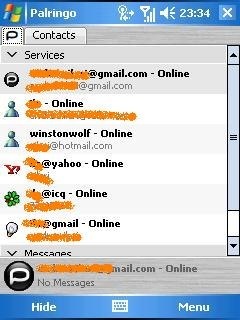
Palringo - http://www.palringo.com/ - I use a lot Instant Messaging services, and from different accounts: Microsoft Live, GTalk, ICQ, Yahoo!. So I need a single app that will connect me to all these networks. Here you have more choices, but in this moment I'm using and appreciating Palringo, for it's fast and reliable. I use it only for instant text messages. Freeware.

Total Commander - http://www.ghisler.com/pocketpc.htm - Pocket windows explorer replacement. I think many people knows about this, I use it a lot. Fast, a lot of services offered. Freeware.

Then there are some other tools I use, like the Calilei Calculator, or Keepass for storing passwords, or OneNote Mobile for taking notes that activesync will synchronize with my work PC, and others... but the most important choices are those I listed.

Hope this helps!

Monday, January 14, 2008

KeySwop and soft keys remapping

In a recent post, I showed how to modify the registry in order to change the left soft key standard assignment.

...and today I discover that there are some utilities, even freeware ones, that help you in this, so removing the need of manually change registry keys. For example, you can use KeySwop, a simple yet complete tool to remap soft keys from yourself!

Wednesday, January 09, 2008

PocketCM, a very good contact manager for Windows Mobile

I installed yesterday PocketCM, a freeware contact manager that you can find here.

And I have a really good impression on this, even if the release number is "0.18" - very low, but it doesn't correspond to the stability of the app, that is really good. It could easily win a place in my list of "never without" apps!

The interface is realized to allow for a "finger" use, and it works. The screenshots on the site do not show all the smooth transitions (scrolling, moving from a function to the other, and so on) that give a really good feeling. 

It's fast, and way better than the standard contact manager, at least if you compare to the WM5 one.

On the same site you can download a keyboard app replacement, that will be useful if you want to use the keyboard with your fingers. I installed also this one, but I have to say that it's a bit slow in starting; then it works, and offers some interesting functionalities; go to the site page to understand its use.

Tuesday, January 08, 2008

Windows Mobile 5 - Left Soft Key and PocketInformant

Just because I needed it and it's not so easy to find... If you need to remap the left soft key in Windows Mobile (the standard link is to "Calendar", \Windows\Calendar.exe) you have to modify the registry key:

HKEY_CURRENT_USER/Software/Microsoft/Today/Keys/112

There you have two string keys, Default and Open. Default contains the String you want to display in the menu, Open contains the path to the app you need to use for that.

For example I lost my PocketInformant Calendar link (due to the setup of another app that overwrote that voice) and I restored to my previous situation writing in the "Open" key the following:

Programmi\WebIS\PocketInformant\PITab.exe" 11

Blue Keys

Sunday, December 16, 2007

Pocket Informant and Handango "Free App Friday"

I discovered this last week that handango has this "Free App Friday". Put simply, every friday (considered in Central Standard Time), they will offer for free a mobile application from their (huge) catalog.

This last Friday the chosen app was Pocket Informant 2007, a very good time management application for Windows Mobile. I downloaded it, now it's running on my mobile, and I'm really happy with it.

Some time ago I bought Agenda Fusion 8, so I can try a comparison between the two.

And after my first two days of Pocket Informant, I can say that PI2007 is faster than AF8, both in terms of first load and using it (for example I can access my long contact list in a fraction of time, and this is really a good thing).

Maybe AF8 wins in terms of graphical details and rendering, but PI2007 views are effective and clear. There are a couple of functionalities that are present only in AF8 (the project view is not present in PI2007, or at least until now I did not find anything of the like), but what is needed is there, and works.

AF8 is a good product, don't take me wrong; but on my device (not a cutting edge one, WM5 with a lot of installed software) PI2007 works better... and I'm happy with it!

Tuesday, December 11, 2007

Squace beta - mobile content in a new, squared, way

sq_1

Squace. Beta. (what else?!?!?)

It's a new way to collect contents, coming from different sources, on your mobile (java-enabled) device.

I'm trying it on my WM5 pocket pc (an "old" i-mate k-jam), and I have to say that it works without any problem.

The idea here is that you have a grid of little squares, each representing a link to a site, an rss feed, a post, whatever. You will collect all your contents in a page named "My Stuff"; in the following screenshot you can see my initial page, on it I clicked on a particular square:

sq_2

That particular square represents a link to a "site" I created. This site is simply a container to a couple of blogs I write; obviously you can reach a very big array of content already present, searching in it thru keywords or navigating tags that other squace users gave to content pages.

sq_3

Here below I'm clicking on a square representing a post in the blog you're reading:

sq_4 

And here is the post:

sq_5

I have mixed feelings on this app. I like the idea, I think it is actually new and from a mobile user perspective it's also easy to use; I have still to make an opinion on its future, but I think I still need to use it for some time before I understand this... :-)

Sunday, December 02, 2007

GMaps for Windows Mobile

It's amazing: the new version of Google Maps for Mobile is able to determine your position based not on GPS signal, but using the relative position of GSM cells around you.

And it works!

Here is a screenshot of "me" in my office, in Milan:

gmaps_gsm_position

It's a really good program, until now I found only a minor problem: during setup, even if you ask to install GMaps on your memory card, the setup will install the app on the main memory; so that you then have to move everything by hand and recreate the shortcuts... then it works.

Thursday, November 22, 2007

Palringo - IM for mobile and desktop

Today I read this post on LifeHacker and I decided to give Palringo a try: it's an IM app that runs on Windows Mobile - powered devices and on Symbian (but Palringo has also a desktop Windows version, and if I understand well a java mobile version is planned), and I find it really good.

In order to work you need to register on palring's own site, and then use those credentials on your mobile device to login; then you start adding your identities on the various protocols and networks Palring knows about: Msn/Live, GTalk, ICQ, Yahoo, AIM. And its proprietary network too.

I used it and I find Palringo fast and reliable... A little screenshot here:

palringo

Monday, November 05, 2007

Rush Hour!

After I sent the link to the download of this game, a friend of mine told me that now I owe him some... hours of life that he lost after the traffic jams of this tiny but really addictive game.

Your task is to let the red "car" move outside the diagram, just like it was locked in a parking and you're in charge of solving the problem...

Go and download it - but this time don't tell that I didn't warn you!!!

It's for Windows Mobile.

http://www.fredvonk.eu/downloads.htm

Did I mention that's also free?

New York

Monday, August 20, 2007

Gps Speed Sentry - windows mobile app

I'm having a lot of fun using this "Gps Speed Sentry" app, that you can download from http://www.tchartdev.com/

This app features a series of screen showing, for the trip you're having:

- a graph on you speed

- a graph on altitude

- a compass

- some general information on actual speed, average speed, top speed, trip duration

- data on GPS satellite in sight

I find it really funny: try it if you have a gps-enabled windows mobile (or and external bluetooth gps antenna like me). The app will cost you $10, the trial version will disconnect from GPS monitoring every 10 minutes (not losing data, anyway).

Here's a screenshot, but please visit the developer's site for many other.


Thursday, April 05, 2007

DeepFish, from Microsoft Labs

Still in a closed beta stage, DeepFish is a mobile browser that mixes a server-side elaboration of the web pages in order to render web pages on the mobile screen just as they would be seen on a standard "non mobile" browser.

When you navigate to a page, DeepFish first of all generates (server-side) a sort of screenshot of the needed page, and sends this image to the mobile client; there with some client functionalities like panning and zooming the user will read the page... obviously things like form submission and client caching are present. Take a look at this presentation to understand better.

Tuesday, March 27, 2007

ZenZui - a mobile widget browser

ZenZui is a brand new entry in the "mobile widget browser" ecosystem, in which you can also find other players like BluePulse and Widset (from Nokia), and some others.

ZenZui was intially developed from Microsoft, now is an independent spin-off.

Actually ZenZui is not yet a real downloadable solution, but I think it will soon. Reading here and there I find interesting the business model they are going to implement - nothing so revolutionary, but it can work. Quoting from the site: " using well-established advertising principles like CPA and CPM (we call it CPZ – Cost Per Zoom)".

I will not try to explain how the interface will be, I prefer to redirect you this YouTube Video showing the ZenZui app working.


Monday, March 12, 2007

pRSSReader

 In my long and exhausting ;-) journey towards the best RSS reader for Windows Mobile (Pocket PC) I found this great app, pRSSReader (a question for me: why did I find it only now???).

SImple to use, at the same time it offers a lot of functionalities; I uninstalled all the similar tools I tried in the past, now I use only this.

Some screenshot follow; there is only a single thing missing, in my opinion, a thing that I found really useful in other similar apps: the ability to send the content of a particular post thru email, without having to go all the way long thru copy&switch-to-email-app&paste&send&back.

Apart from this pRSSReader is really worth a try; it's freeware but you'll find that a PayPal "donation" to the author, David Andrš, could be a good idea.


Sunday, March 11, 2007

Qode

In a recent comment in this blog I was "pointed" to Qode's web site.

Qode is similar to ShotCode, but both work in a different way than MoBeam (I talked about MoBeam here some days ago).

What I mean is that with Qode (as with ShotCode) you use the mobile device's camera to grab the barcode (or similar object) in order to be transferred to a web site. With MoBeam - as far as I have understood - the mobile device is used to show the barcode to the "real" world; for example to the laser scanner at the discount cashier...

Anyway Qode is interesting, like Shotcode is.