Saturday, March 15, 2008

Xobni - installed right now...

I just installed the Xobni Outlook plugin, that's now in public beta.

The Xobni claim is about "email happiness", and if it works like the video demonstrations say it will be actually a good product.

It works as a sidebar, every new functionality is there in the Xobni sidebar; a different approach from ClearContext, for example, that integrates its services in the standard Outlook menus and windows.

Just installed, let's see how it works... and let's see if ClearContext AND Xobni can live together!!!

Tuesday, March 11, 2008

pBar, task manager, freeware

I'm trying this pBar task manager/switcher.

This is very good, I'm replacing the "Magic Button" task switcher I was using (I'm going to update my preferred windows mobile apps list).

What I like on this pBar? Weel, for exmple the possibility to have all the task managing functions AND a list of preferred shortcuts AND a list of common functions AND the chance to have both the battery level and curtrent time shown in the top right icon.

Monday, February 11, 2008

My windows mobile 5 device apps list

Last week I had to reinstall everything from scratch on my k-jam, and this time I decided to write the list of apps that I reinstalled immediately, without any question.

Most of them are good freeware apps, with some exceptions. Maybe this list will be of some help for some. Here we go with the list (in no particular order):

cLaunch - http://pachome1.pacific.net.sg/~welic/claunch.html - Configurable application launcher. Very good, I tried other choices but then I came back to this one. I briefly posted on it also here... Freeware.

pBar - http://forum.xda-developers.com/showthread.php?t=284952 - a very good freeware Task Manager, replacing Magic Button (described just below).

Magic Button - http://www.trancreative.com/mb.aspx - Task Manager. A stable and fast app, small memory footprint. Really useful. Freeware. Replaced by pBar, but still worth a mention!

LVMTime - http://forum.xda-developers.com/showthread.php?t=260441 - today plugin and configurable clock app. I use this clock aplication for many reasons, the main one is that it offer a NNTP synchronization that works. Good, many configuration options. Freeware.

pRSSReader - http://pda.jasnapaka.com/prssr/ - RSS reader. I tried many rss reader apps, but in the end I switched to this one, I think it's the best one in the freeware world.

Pocket Informant - http://www.pocketinformant.com/ - I wrote some time ago about this personal time manager app, that I find really good. And I still have to upgrade to the very last release (I still use P.I.2007). This is PayWare.

S2U2 - http://forum.xda-developers.com/showthread.php?t=353008 - "Slide To Unlock 2" is a freeware lock/unlock app that will show on the screen also the current time and date, the next agenda appointment, some icons showing the number of unread mail messages, not completed tasks, sms, missed calls... the background can be customized, and there are a lot of settings you can modify. Quite stable in the last release (I'm running 0.99c). Freeware.

PocketCM - http://www.pocketcm.com/ - in this post I already wrote about this contact manager; this app now has completely replaced the standard WM5 contact manager on my device. Freeware, fast, stable, very good. 

PHM Registry Editor - http://www.phm.lu/products/PocketPC/RegEdit/ - what can I say on this: it works. And well. Freeware.

ClearTemp - http://mobile-sg.com/software/?p=ClearTemp&platform=ppc - a must have, it's a very good utility to clear temporary files (from many applications) in you device. Freeware.

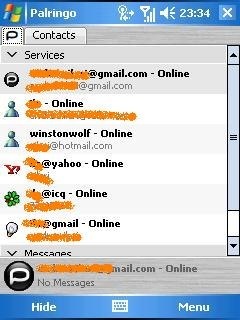
Palringo - http://www.palringo.com/ - I use a lot Instant Messaging services, and from different accounts: Microsoft Live, GTalk, ICQ, Yahoo!. So I need a single app that will connect me to all these networks. Here you have more choices, but in this moment I'm using and appreciating Palringo, for it's fast and reliable. I use it only for instant text messages. Freeware.

Total Commander - http://www.ghisler.com/pocketpc.htm - Pocket windows explorer replacement. I think many people knows about this, I use it a lot. Fast, a lot of services offered. Freeware.

Then there are some other tools I use, like the Calilei Calculator, or Keepass for storing passwords, or OneNote Mobile for taking notes that activesync will synchronize with my work PC, and others... but the most important choices are those I listed.

Hope this helps!

Monday, January 21, 2008

hulu.com, impression of usage

Ok, using a "non-standard" method I managed to access hulu.com.

Today I browsed the titles for a while, then I decided to watch a Simpsons episode, exactly "E. Pluribus Wiggum", season 19, episode 10 (wow it's almost 20 years of Simpson's broadcast!) and an excerpt from a '76 Saturday Night Live... with Chevy Chase an John Belushi (I really like those old SNL clips, they're great!)

Well, the viewing experience is good, I have to say - only some glitch here and there in the few starting seconds, but I immedialtely learned that after a reposition at the start, then the playing is smooth and continuous.

In the longer clips you will find some ads, and you can "see when" they will arrive thanks to some marker in the timeline indicator. During these ad shorts you cannot skip forward or pause... but hey, that's fine for me :-). A curiosity: the Viewing applet has this ""lower light" function, that is a little but helpful function: it will darken (but not completely) everything in the browser window except the viewing area. Good idea.

I plan to access more content on Hulu asap, but in my opinion it's a really good service. Thanks, Hulu!!!

Bye!

Wednesday, January 16, 2008

Survival: Sql Server, change ownership on stored procedures

Some time ago I wrote about a couple of methods to grant execution permission on stored procedures, on Sql Server 2000.

Now I had to write something similar, but the scope was to change ownership of the objects; after some googling I found this page on support.microsoft.com that lists a good way to do the job... but I modified slightly the code from MS, because I needed the possibility to decide to actually execute the commands or simply print them.

So I added a simple parameter (the third), datatype bit, default 0 (false). When set to 1 (true) will cause the execution of the commands.

Here's the code:

CREATE PROCEDURE [dbo].[chObjOwner]( @usrName varchar(20), @newUsrName varchar(50), @exec bit = 0)
as
-- @usrName is the current user
-- @newUsrName is the new user

set nocount on
declare @uid int                   -- UID of the user
declare @objName varchar(50)       -- Object name owned by user
declare @currObjName varchar(50)   -- Checks for existing object owned by new user
declare @outStr nvarchar(256)       -- SQL command with 'sp_changeobjectowner'
set @uid = user_id(@usrName)

declare chObjOwnerCur cursor static
for
select name from sysobjects
where 1=1
AND uid = @uid
AND xtype in ( 'P', 'U', 'V')
and name <> 'chObjOwner'
-- category: zero is valid for Stored Procedures... but not for tables
-- and category = 0

open chObjOwnerCur
if @@cursor_rows = 0
begin
  print 'Error: No objects owned by ' + @usrName
  close chObjOwnerCur
  deallocate chObjOwnerCur
  return 1
end

fetch next from chObjOwnerCur into @objName

while @@fetch_status = 0
begin
  set @currObjName = @newUsrName + '.' + @objName
  if (object_id(@currObjName) > 0)
    print 'WARNING *** ' + @currObjName + ' already exists ***'
  set @outStr = 'sp_changeobjectowner ''' + @usrName + '.' + @objName + ''',''' + @newUsrName + ''''
  print @outStr
  IF @exec = 1
    execute sp_executesql @outStr
  --print 'go'
  fetch next from chObjOwnerCur into @objName
end

close chObjOwnerCur
deallocate chObjOwnerCur
set nocount off
return 0

La Castro Taqueria is changing to Kasa Indian Eatery, it seems.

Monday, January 14, 2008

KeySwop and soft keys remapping

In a recent post, I showed how to modify the registry in order to change the left soft key standard assignment.

...and today I discover that there are some utilities, even freeware ones, that help you in this, so removing the need of manually change registry keys. For example, you can use KeySwop, a simple yet complete tool to remap soft keys from yourself!

Sunday, January 13, 2008

hulu - now I can reach it, thanks to AnchorFree

I installed AnchorFree Hotspot Shield, and thru this new VPN (ad supported) now I can access all the HULU content (but as far as I know also Pandora or any other service blocked to non-US people).

So now I'm looking at one Simpsons episode, and I just browsed some Saturday Night Live episodes... hulu.com is great!!!

If you also want to try the Anchor Free app, please go here. And happy navigation :-)

Anchor

Wednesday, January 09, 2008

PocketCM, a very good contact manager for Windows Mobile

I installed yesterday PocketCM, a freeware contact manager that you can find here.

And I have a really good impression on this, even if the release number is "0.18" - very low, but it doesn't correspond to the stability of the app, that is really good. It could easily win a place in my list of "never without" apps!

The interface is realized to allow for a "finger" use, and it works. The screenshots on the site do not show all the smooth transitions (scrolling, moving from a function to the other, and so on) that give a really good feeling. 

It's fast, and way better than the standard contact manager, at least if you compare to the WM5 one.

On the same site you can download a keyboard app replacement, that will be useful if you want to use the keyboard with your fingers. I installed also this one, but I have to say that it's a bit slow in starting; then it works, and offers some interesting functionalities; go to the site page to understand its use.

Tuesday, January 08, 2008

Windows Mobile 5 - Left Soft Key and PocketInformant

Just because I needed it and it's not so easy to find... If you need to remap the left soft key in Windows Mobile (the standard link is to "Calendar", \Windows\Calendar.exe) you have to modify the registry key:

HKEY_CURRENT_USER/Software/Microsoft/Today/Keys/112

There you have two string keys, Default and Open. Default contains the String you want to display in the menu, Open contains the path to the app you need to use for that.

For example I lost my PocketInformant Calendar link (due to the setup of another app that overwrote that voice) and I restored to my previous situation writing in the "Open" key the following:

Programmi\WebIS\PocketInformant\PITab.exe" 11

Blue Keys

Friday, January 04, 2008

Outlook 2007 (was) painfully slow!!!

I hope I managed to solve this issue, that was causing me a lot of trouble and of wasted time.

What I was experiencing: from a certain date on OL2007 was really slow in opening, then in updating headers, then it hanged for seconds while I( was composing new messages, then... in a word it was going to be completely un-usable.

After googling and discussing for days, trying different ways, that went from disabling RSS feeds to checking out encryption in transmission between OL and Exchange, finally I understood that my real problem was... the mailbox size. And the corresponding OST file size on my hard disk.

What i understand is that in OL2007 MS changed the underlying data structure of PST and PST files, in a way that requires a lot of disk access when the file size is big. So the solution for me has been "simply" to split my OST archiving some hundreds of messages in a new .pst file.

I think that I need some more archiving work, to really solve the issue; but even now OL reacts much better than before.

hope this helps... :-)

Butt Out

Sunday, December 16, 2007

Pocket Informant and Handango "Free App Friday"

I discovered this last week that handango has this "Free App Friday". Put simply, every friday (considered in Central Standard Time), they will offer for free a mobile application from their (huge) catalog.

This last Friday the chosen app was Pocket Informant 2007, a very good time management application for Windows Mobile. I downloaded it, now it's running on my mobile, and I'm really happy with it.

Some time ago I bought Agenda Fusion 8, so I can try a comparison between the two.

And after my first two days of Pocket Informant, I can say that PI2007 is faster than AF8, both in terms of first load and using it (for example I can access my long contact list in a fraction of time, and this is really a good thing).

Maybe AF8 wins in terms of graphical details and rendering, but PI2007 views are effective and clear. There are a couple of functionalities that are present only in AF8 (the project view is not present in PI2007, or at least until now I did not find anything of the like), but what is needed is there, and works.

AF8 is a good product, don't take me wrong; but on my device (not a cutting edge one, WM5 with a lot of installed software) PI2007 works better... and I'm happy with it!

Tuesday, December 11, 2007

Squace beta - mobile content in a new, squared, way

sq_1

Squace. Beta. (what else?!?!?)

It's a new way to collect contents, coming from different sources, on your mobile (java-enabled) device.

I'm trying it on my WM5 pocket pc (an "old" i-mate k-jam), and I have to say that it works without any problem.

The idea here is that you have a grid of little squares, each representing a link to a site, an rss feed, a post, whatever. You will collect all your contents in a page named "My Stuff"; in the following screenshot you can see my initial page, on it I clicked on a particular square:

sq_2

That particular square represents a link to a "site" I created. This site is simply a container to a couple of blogs I write; obviously you can reach a very big array of content already present, searching in it thru keywords or navigating tags that other squace users gave to content pages.

sq_3

Here below I'm clicking on a square representing a post in the blog you're reading:

sq_4 

And here is the post:

sq_5

I have mixed feelings on this app. I like the idea, I think it is actually new and from a mobile user perspective it's also easy to use; I have still to make an opinion on its future, but I think I still need to use it for some time before I understand this... :-)

Monday, December 10, 2007

hulu.com - private beta, but... where do I live?

Ok, I've been invited in the new hulu.com private beta. I'm really interested in this new ways to deliver contents to the (web) public, so on my pc I have both joost and babelgum clients, and also Miro.

Enter Hulu: in this case I don't need any new client, everything is delivered thru the standard browser. The layout and dynamics of the interface is quite cool, I like this site.

Ok then, let's go and try to access some content. I see an episode from "The Simpsons" highlighted in the first page, I click on it.

Uhm... the player returns a message stating that: "Unfortunately this video is not currently available in your country or region".

Ok, I'll try with some other clip. House? ok, let's give it a try.

...same message. And also the same message pops up with every single choice I try.

Now I'm asking: is it caused by the fact that I live in Italy? and probably they cannot "broadcast" those content due to a DRM problem or something of the like? The support pages tell me that "For now, Hulu is a U.S. service only."

Ok, fine. But in this precise moment I could be anywhere in the world, I'm in the "internet" country... or I could be a US citizen, living temporarily in Italy, or again I could be an italian citizen, temporarily living in Iceland, or Morocco, or even USA.

So please explain this to me: I know I could simply go on YouTube and look for that Simpsons episode, and probably I'll find it; and there are many other way to access that video, but... but yes, I liked the Hulu idea, site, and contents, and I was excited to use it.

Annoying.

p.s.: no, I cannot modify my profile, the site doesn't permit this at the moment... I already checked ;-)

televisione.

Sunday, December 02, 2007

GMaps for Windows Mobile

It's amazing: the new version of Google Maps for Mobile is able to determine your position based not on GPS signal, but using the relative position of GSM cells around you.

And it works!

Here is a screenshot of "me" in my office, in Milan:

gmaps_gsm_position

It's a really good program, until now I found only a minor problem: during setup, even if you ask to install GMaps on your memory card, the setup will install the app on the main memory; so that you then have to move everything by hand and recreate the shortcuts... then it works.

Saturday, November 24, 2007

ClearContext IMS

If you use Microsoft Outlook and like me receive a huge load of emails during your work day, give a look to ClearContext - it's not free, but it's really a great software, helps a lot in clearing and sorting tour inbox, and "getting things done".

I'm in the 30 days trial period, but I think that I will buy this one.

What you get after setup is a new Outlook toolbar that will help you categorize your email and file single mails or threads to folders (that ClearContext will create for you), and give you shortcut to new functions like prioritizing your contacts (so that email from high priority contact will display with greater emphasis), or turn off email notifications for - say - 30 minutes or an hour... but actually the things that ClearContext can do for you are many, and you will get e netter service :-) if you jump to their site and give a look to some of the very good video tutorials offered!

Rural mailbox

Thursday, November 22, 2007

Palringo - IM for mobile and desktop

Today I read this post on LifeHacker and I decided to give Palringo a try: it's an IM app that runs on Windows Mobile - powered devices and on Symbian (but Palringo has also a desktop Windows version, and if I understand well a java mobile version is planned), and I find it really good.

In order to work you need to register on palring's own site, and then use those credentials on your mobile device to login; then you start adding your identities on the various protocols and networks Palring knows about: Msn/Live, GTalk, ICQ, Yahoo, AIM. And its proprietary network too.

I used it and I find Palringo fast and reliable... A little screenshot here:

palringo

NetMeeting on Vista?

yes, I already know: NetMeeting is obsolete, vulnerable, no more cool, and whatever. But, you know, life is strange, and a customer needs me to connect with him thru NetMeeting... but I moved to Vista, and NetMeeting (the good old "conf.exe" in other windows flavours) is no more available. But to my surprise I discovered that a hotfix is available (with many big different disclaimers) in order to bring NetMeeting back to me!

Find it on http://thehotfixshare.net/ (a site that's really amazing, but this is another story), register there and then make a search for NetMeeting.

Hope this helps!

Tuesday, November 13, 2007

If Outlook doesn't open web links anymore...

On Windows Vista, open Control Panel, click "Programs", then "Default Programs".

There, click "Set program access and computer defaults", open the "Custom" section. You should then choose "Internet Explorer", then close everything , Control Panel, Outlook, Internet Explorer... this worked for me.

Hope this helps!

Monday, November 05, 2007

Rush Hour!

After I sent the link to the download of this game, a friend of mine told me that now I owe him some... hours of life that he lost after the traffic jams of this tiny but really addictive game.

Your task is to let the red "car" move outside the diagram, just like it was locked in a parking and you're in charge of solving the problem...

Go and download it - but this time don't tell that I didn't warn you!!!

It's for Windows Mobile.

http://www.fredvonk.eu/downloads.htm

Did I mention that's also free?

New York

Thursday, November 01, 2007

PowerLabs!

At last I have an account on Powerlabs!!! Great, I'll keep you informed... :-) For now I'm still trying to understand how to "move" in Powerlabs and how to use this (great) site!!!

Until now I'm simply trying the demos, in which i'm asked to compare the results from PowerLabs vs. "The Other Guys". Then you can "vote" on who gave the better results.

The query are something like "What did ____ write?". You complete filling in the blanks, launch the query, then compare the results. Queries in the demo are launched against Wikipedia.

Ok, I'll go on trying, then I'll tell you! Bye.

Query