Monday, October 10, 2011

Facebook–how to set the height of your tab

Today I had to set to more than 800 pixels the height of my tab. I found here a simple solution, thanks a lot to Amit Jain.

Steps in brief:

  1. in the app “canvas settings” set the height to “Settable”, like in the image shown below.
  2. add to the <body> line: style="overflow: hidden" (to remove the scrollbars)
  3. add to your main <div> (the one that contains your html) the style: style="height:2000px; width:520px;" – obviously you will set your desired height
  4. finally, just below the <body> tag, add this code:

<div id="fb-root"></div> 
<script> 
  window.fbAsyncInit = function() { 
FB.Canvas.setAutoResize(); 
  }; 
  (function() { 
var e = document.createElement('script'); e.async = true; 
e.src = document.location.protocol + '//connect.facebook.net/en_US/all.js'; 
document.getElementById('fb-root').appendChild(e); 
  }()); 
</script>
 

that’s it – worked for me!

2011-10-10_1630

Monday, September 05, 2011

Windows Phone traffic on Fiddler? Here’s how

Yes, it’s possible, and there is a fantastic page that explains how, here’s the link.

All the configuration needed took a couple minutes, and it worked perfectly.

Thanks Eric for this great article!

Thursday, September 01, 2011

Sql Server–find some texts in Stored Procedures

I often need to search for some texts in the body of stored procedures. This query can help:

SELECT routine_name, routine_definition
FROM information_schema.routines
WHERE UPPER(routine_definition) LIKE UPPER('%texttobesearched%')
AND routine_type='procedure'

EDIT: just discovered that this method has some problems with long stored procedures; found another one that works better:

declare @searchString varchar(100)

Set @searchString = '%' + 'text to be searched' + '%'

SELECT Distinct SO.Name
FROM sysobjects SO (NOLOCK)
INNER JOIN syscomments SC (NOLOCK) on SO.Id = SC.ID
AND SO.Type = 'P'
AND SC.Text LIKE @searchString
ORDER BY SO.Name

Wednesday, August 31, 2011

Windows Phone 7 - NavigateToString, WebBrowser, and anchors

I needed to show some html in a page, using a WebBrowser control and the NavigateToString method.

The html was ok; it has some anchor in it to move from a section to another.

When I tested it in a standard web browser, or loading it with the phone IE9, worked perfectly.

But when I loaded the same html in the app page, using as I said the Navigatetostring method, the anchors didn't work anymore.

Then I tried to use some javascript to move to the anchors, using location.replace(#anchorname) – but again when I tested the html outside the app it worked… but not in the app.

I posted the question to the MSDN Forums, end Eric Fleck suggested me to use another approach, while confirming that the wrong behavior is in the latest RC of the WP7 tools.

The new approach is described in detail in this MSDN page, and basically uses IsolatedStorage to save the html fragments in order to load them in the WebBrowser using the .Navigate method. This way all the anchor links work… and I’m happy Sorriso

G’day everybody!

Tuesday, August 23, 2011

Some “metro style” windows phone backgrounds

Found today: I like these backgrounds, see if you like them:

- Metro Lock for Windows Phone

- Metro Lock 2 for Windows Phone

A couple images, in Mango Occhiolino flavour:

Metro Lock (Mango)Metro Lock 2 (Mango)

Windows Phone 7 – Mango time

Today I uploaded my first Mango update. My “Fatto Quotidiano” app now id 7.1 compatible!

To celebrate this I also rewdesigned completely the layout, now the app is more readable, I think that it’s really better than before.

A couple of useful links / resources:

- To download the Windows Phone SDK 7.1 Release Candidate go here: SDK 7.1 RC

- With the RC you will also have at your disposal a great tool: the “Marketplace Test Kit”, integrated with Visual Studio. The tool “provides a suite of automated, monitored, and manual tests to help make sure that your applications are accepted in the Marketplace the first time you submit them”. Read about it here.

To see the list of my WP7 apps, click here

Wednesday, March 23, 2011

Sql Server Management Studio & “WTF”

Open Sql ServerManagement Studio, Open a New Query, Type WTF and press Enter.

Have fun.

Saturday, February 26, 2011

Some WP7 apps

ilomilo got a new refresh, a whole bunch of new puzzles to solve! great game - check this link: http://blog.ilomilo.com/2011/02/ilomilo-windows-phone-7-title-update/

Yelp! is available on the italian marketplace - http://officialblog.yelp.com/2010/11/yelp-gets-a-windows-phone-7-app.html

Resco Radio is a really good internet radio manager – check out this link http://wmpoweruser.com/resco-radio-for-windows-phone-7-preview/

Birdsong is my favorite Twitter client, in the next days the 1.2 release will be out, http://red-badger.com/Blog/

Friday, February 25, 2011

Mail in spam? Try (also) this…

Recently some messages from one of my site started being marked as spam by gmail and others.

The particular message is the “confirm registration” one, and it’s easy to understand that it’s imperative that it does not go to the spam folders… if you want regitered users, I mean.

I noticed that in the standard routine that we use to send mail messages there was no setting for the “Message-ID” header. I tried to add it (see below a code sample) and now the “marked as spam” rate is incredibly low!

See here (Wikipedia) a brief explanation of what the particular Message-ID header field is.

Here is the code sample, in bold the three new lines:

private bool PrepareAndSendMail(string emailKey, string senderName, string senderEmail, string destName, string destEmail, StringDictionary args)
{
    try
    {
        MailMessage m = new MailMessage();

        m.From = new MailAddress(senderEmail, senderName);
        m.To.Add(new MailAddress(destEmail, destName));
        m.Subject = MailSettings.Emails[emailKey].Subject;

        // this is to limit the "marked as spam" messages
        Guid messageGuid;
        messageGuid = Guid.NewGuid();
        m.Headers.Add("Message-ID", messageGuid.ToString());

        m.IsBodyHtml = true;
        m.BodyEncoding = Encoding.GetEncoding("iso-8859-1");
        m.Body = ReadTemplateFromFile(Globals.MapPath(MailSettings.Emails[emailKey].Template), args);

        return SendMail(m);
    }
    catch (Exception ex)
    {
        Log.Error("An error occurred sending mail", ex);
        return false;
    }

}

Friday, October 01, 2010

Windows Phone 7 – emulator’s shortcut

I discovered about these shortcut only today, so maybe this short post it can be useful to other devs.

When you enter a textbox in the emulator, the virtual keyboard comes up; and you can use it with your mouse. But if you need to enter text in a faster way, you can hit PageUp, and use the “real” pc keyboard.

Then you can switch back to the virtual keyboard with PageDown.

Other useful shortcut:

  • F1 – corresponds to the Back button on the emulator
  • F2 – the "Start" button on the emulator
  • F3 – the Search button on the emulator

Windows Phone 7 – my first app :-)

I’m working on a little application for the new Windows Phone 7 operating system.

The app, TimeToRead, is a client for Read It Later (http://readitlaterlist.com). Its goal is to let you access your “reading list” when you have time… to read something you pinned earlier.

It will provide you the lists of read / unread / all articles; tapping an article you can read it directly from the web version or choose to read only the “text version” (this is a service provided by readitlaterlist.com site), mark as read an article and finally tweet about the article on your Twitter account.

The app uses some libraries like json.net and Hammock for REST in order to access the external sites. It’s not very complicated, still I think that it can be useful – let’s see.

A few screenshots:

image

image

image

and here’s a little video I posted on Msdn Italy’s Facebook page – it’s not of the latest release, but it gives an idea.

Ciao!

Monday, August 02, 2010

Sql Server Fragmentation

Found in an article on SqlServerCentral (VERY useful site), some scripts that show the fragmentation degree of your database objects:

-- check fragmentation on @db
Declare @db     SysName;
Set @db = 'MCD_SAWFC_PROD';

SELECT CAST(OBJECT_NAME(S.Object_ID, DB_ID(@db)) AS VARCHAR(20)) AS 'Table Name',
CAST(index_type_desc AS VARCHAR(20)) AS 'Index Type',
I.Name As 'Index Name',
avg_fragmentation_in_percent As 'Avg % Fragmentation',
record_count As 'RecordCount',
page_count As 'Pages Allocated',
avg_page_space_used_in_percent As 'Avg % Page Space Used'
FROM sys.dm_db_index_physical_stats (DB_ID(@db),NULL,NULL,NULL,'DETAILED' ) S
LEFT OUTER JOIN sys.indexes I On (I.Object_ID = S.Object_ID and I.Index_ID = S.Index_ID)
AND S.INDEX_ID > 0
ORDER BY avg_fragmentation_in_percent DESC

The following SQL can be used to rebuild all indexes for the specified table;

ALTER INDEX ALL ON <Table Name> REBUILD;


while the following SQL can be used to rebuild a specific index.


ALTER INDEX <Index Name> ON <Table Name> REBUILD;


Alternatively, indexes can be reorganised. The following SQL can be used to reorganise all indexes for the specified table;


ALTER INDEX ALL ON <Table Name> REORGANIZE; 


while the following SQL can be used to reorganise a specific index.


ALTER INDEX <Index Name> ON <Table Name> REORGANIZE; 

Tuesday, June 29, 2010

stsadm, where is it?

I often forget the location of stsadm, the admin command line tool for MOSS. Here it is:

%COMMONPROGRAMFILES%\microsoft shared\web server extensions\12\bin

bye

Monday, June 14, 2010

Get a list of installed programs in Windows

I’m in the middle of a transition from a pc to another, and I’d like to reinstall all the software I (probably) need.

I recently discovered that there is a way to get such a list without the need of third party software, using WMIC (Windows Management Instrumentation Command-line). Here’s how.

  • open a command prompt with administrative rights (“cmd” and Control+Shift+Enter)
  • type wmic and press enter
  • then type this command: /output:C:\swlist.txt product get name,version,installdate,description

This way you’ll obtain the complete list of what has been installed on your Windows environment… but do not forget that sometimes you use software that does not installs but instead runs directly – so probably this list will not be complete.

To get more insights on WMIC you can browse the command-line help with /? – or read articles like this one.

Tuesday, May 11, 2010

SOLVED: Sql Server 2008 log shipping on servers not in same domain

Lately I suffered some headache trying to set up log shipping on a couple of Sql Server 2008 machines.

In my farm, the “second” server arrived when the first was already running, responding to a high traffic website. And the two servers are not in the same domain – actually they are not in any domain.

I won’t enter in detail on how to set up log shipping, follow the wizard, it’s quite easy (to reach the wizard: right click on a db, choose Tasks, then “Ship transaction logs”).

When you set up log shipping, and the servers are in the same domain, you have little problems: you need to create a couple of file share on the two servers, and give read permissions to accounts running the Sql Server Agent service “on the other” server. But that is quite easy, follow instructions and it’s done.

A different story is when the shipping server don’t know anything of the “shipped” one. I tried different configuration, but I always end in “Access denied” errors.

At last I found this answer on Serverfalult.com, and that was the path to follow. The answer is about Sql 2005, but the same works on sql 2008.

In brief, here’s what I did:
- created an account on the two servers, with exactly the SAME NAME and the SAME PASSWORD, and put the user in Administrators group
- changed identity (“log on” tab) of both Sql Server Agent AND Sql Server services (only Agent did not suffice) on both servers
- gave read permission on the share used in the log shipping configuration

Done all that, when I ran the log shipping job they started working immediately.

Now I’m not a windows authentication guru, but all this looks a little crazy to me… but hey, who cares! Now log shipping works… :-)

Tuesday, January 05, 2010

Speeed Reader, Google Reader client for WinMobile

A couple months ago I found Speeed Reader, a Windows Mobile client to access Google Reader accounts. Yes it’s Speeed, with three “e” in it.

I wasn’t using my Google Reader account anymore exactly for the reason that it was difficult to access it from my WinMo phone, so when I read of this software I decided immediately to try it.

And let me say that Speeed Reader is exactly what I needed… and probably what you need if you have a Google Reader account. And use Windows Mobile.

The interface is simple: after logging in (you can ask Speeed Reader to login automatically when launched) the application loads all the feeds grouped by “tag” (as you categorized them in Google Reader) and shows an indicator reporting the number of unread items in each tag / category.

You can browse the tags, and see all the feeds in it, open a feed and read the posts.

There are (and I find this particularly useful) some tools to share the posts through twitter / email / sms. And you can set refresh intervals, if you want.

The reading is very good, Speeed Reader does a pretty good job in rendering tags and downloading images. There is the possibility to tell the application to cache a fixed number of article, and read them in “offline” mode".

Did I tell you that it’s also very fast? Right now this is one of the most used apps in my device.

You can download a trial version of Speeed Reader 1.11 from this url: http://emuneee.com/2010/01/speeed-reader-v1-11/ then if you like it you can reach it in Handango for $1.99, exactly here: http://www.handango.com/catalog/ProductDetails.jsp?storeId=2218&deviceId=1925&platformId=30&productId=264566

I think that for $1.99 this is a must-have.

Now some screenshots. First the tags list:
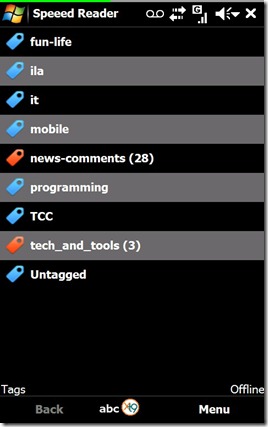
SR01

Then some articles from LifeHacker.com:
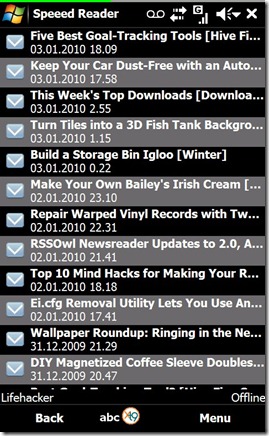
SR02

This is one article from the Speeed Reader blog:

SR03

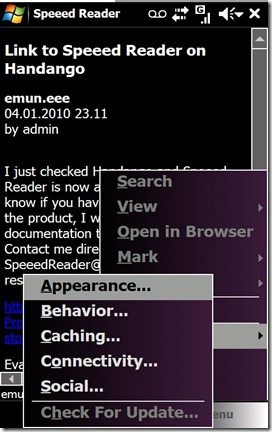
Some menu entries:

SR04

Another “skin” applied (the list is from Seth Godin’s blog):

SR05

The sharing options available:

SR06

Happy reading with Speeed Reader! :-)

Andrea

Sunday, November 29, 2009

Speeed Reader – a Google Reader WinMo client

Hi, just a quick note to tell you something about Speeed Reader, a very good Google Reader client for Windows Mobile. It will read your subscriptions and will sync your read/unread topics. Sharing topics through mail or twitter is easy and fast.

Please visit the site and try it, it’s great. You can follow Speeed Reader also here on twitter: http://twitter.com/SpeeedReader

Dev site: http://emuneee.wordpress.com/eeenno/speeed-reader/

hope this helps

a.

Thursday, November 19, 2009

Sql server getdate() – set to midnight

a very short note on a particular use of getdate() to obtain the today’s date with hours minutes and seconds set to midnight (00:00:00):

select dateadd(day, datediff(day, 0, getdate()), 0)

Friday, November 13, 2009

Facebook – wall post with Facebook Developer Toolkit, stream.publish

Just a c# sample that I find useful to have here – so that everybody around me can find it whenever needed :-)

public void Post(facebook.API fbAPI, string appLink)
{
    string response = fbAPI.stream.publish(
        " decided to go nuts.",
        new attachment()
        {
            name = "my application rocks",
            href = appLink,
            caption = "{*actor*}decided to go nuts.",
            description = "One morning, when Gregor Samsa woke from troubled dreams, he found himself transformed in his bed into a horrible vermin. http://indialimaalpha.blogspot.com/
",
            properties = new attachment_property()
            {
                category = new attachment_category() { text = "Take another action...", href = appLink }
            },
            media = new List<attachment_media>() {
                new attachment_media_image() { src = WebConfigurationManager.AppSettings["AbsolutePath"] + "images/go_joseki.jpg", href = appLink }
            }
        },
        new List<action_link>() {
            new action_link() { text = "Take Action!", href = appLink }
        },
        null,
        0);
}

Friday, November 06, 2009

Sql Server Restore


Some statements I found useful to recover a database backup applying some transaction logs (had to step into this due to a wrong delete operation on a production database – no, it wasn’t me…).

RESTORE DATABASE [TheDatabase]
FROM DISK = 'D:\foldername\bak\FULL_20091102_024436.bak'
WITH
MOVE 'TheDatabase_Data' TO 'D:\Program Files\Microsoft SQL Server\MSSQL\Data\TheDatabase_Data.mdf',
MOVE 'TheDatabase_log' TO 'D:\Program Files\Microsoft SQL Server\MSSQL\Data\TheDatabase_Log.ldf',
NORECOVERY

RESTORE LOG [TheDatabase] FROM DISK = 'D:\foldername\bak\20091102_060214.bak' WITH NORECOVERY

RESTORE LOG [TheDatabase] FROM DISK = 'D:\foldername\bak\20091103_180221.bak' WITH NORECOVERY

[…]

RESTORE LOG [TheDatabase] FROM DISK = 'D:\foldername\bak\20091105_000219.bak' WITH NORECOVERY

RESTORE LOG [TheDatabase] FROM DISK = 'D:\foldername\bak\20091105_060204.bak' WITH RECOVERY

Some comments: the NORECOVERY option used in all the statement but one causes Sql Server to leave the db in a non operational state; this is needed because we will apply other restore statements. In the last one I use the RECOVERY option, in order to put the database in operational state.

Obviously this is only a little part of the big big world of database maintenance: just to say, give a look at the RESTORE command syntax… http://msdn.microsoft.com/en-us/library/ms186858.aspx

Bye!