Saturday, November 24, 2007

ClearContext IMS

If you use Microsoft Outlook and like me receive a huge load of emails during your work day, give a look to ClearContext - it's not free, but it's really a great software, helps a lot in clearing and sorting tour inbox, and "getting things done".

I'm in the 30 days trial period, but I think that I will buy this one.

What you get after setup is a new Outlook toolbar that will help you categorize your email and file single mails or threads to folders (that ClearContext will create for you), and give you shortcut to new functions like prioritizing your contacts (so that email from high priority contact will display with greater emphasis), or turn off email notifications for - say - 30 minutes or an hour... but actually the things that ClearContext can do for you are many, and you will get e netter service :-) if you jump to their site and give a look to some of the very good video tutorials offered!

Rural mailbox

Thursday, November 22, 2007

Palringo - IM for mobile and desktop

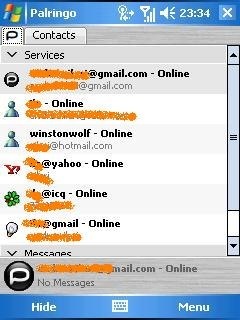
Today I read this post on LifeHacker and I decided to give Palringo a try: it's an IM app that runs on Windows Mobile - powered devices and on Symbian (but Palringo has also a desktop Windows version, and if I understand well a java mobile version is planned), and I find it really good.

In order to work you need to register on palring's own site, and then use those credentials on your mobile device to login; then you start adding your identities on the various protocols and networks Palring knows about: Msn/Live, GTalk, ICQ, Yahoo, AIM. And its proprietary network too.

I used it and I find Palringo fast and reliable... A little screenshot here:

palringo

NetMeeting on Vista?

yes, I already know: NetMeeting is obsolete, vulnerable, no more cool, and whatever. But, you know, life is strange, and a customer needs me to connect with him thru NetMeeting... but I moved to Vista, and NetMeeting (the good old "conf.exe" in other windows flavours) is no more available. But to my surprise I discovered that a hotfix is available (with many big different disclaimers) in order to bring NetMeeting back to me!

Find it on http://thehotfixshare.net/ (a site that's really amazing, but this is another story), register there and then make a search for NetMeeting.

Hope this helps!

Tuesday, November 13, 2007

If Outlook doesn't open web links anymore...

On Windows Vista, open Control Panel, click "Programs", then "Default Programs".

There, click "Set program access and computer defaults", open the "Custom" section. You should then choose "Internet Explorer", then close everything , Control Panel, Outlook, Internet Explorer... this worked for me.

Hope this helps!

Monday, November 05, 2007

Rush Hour!

After I sent the link to the download of this game, a friend of mine told me that now I owe him some... hours of life that he lost after the traffic jams of this tiny but really addictive game.

Your task is to let the red "car" move outside the diagram, just like it was locked in a parking and you're in charge of solving the problem...

Go and download it - but this time don't tell that I didn't warn you!!!

It's for Windows Mobile.

http://www.fredvonk.eu/downloads.htm

Did I mention that's also free?

New York

Thursday, November 01, 2007

PowerLabs!

At last I have an account on Powerlabs!!! Great, I'll keep you informed... :-) For now I'm still trying to understand how to "move" in Powerlabs and how to use this (great) site!!!

Until now I'm simply trying the demos, in which i'm asked to compare the results from PowerLabs vs. "The Other Guys". Then you can "vote" on who gave the better results.

The query are something like "What did ____ write?". You complete filling in the blanks, launch the query, then compare the results. Queries in the demo are launched against Wikipedia.

Ok, I'll go on trying, then I'll tell you! Bye.

Query

Wednesday, October 24, 2007

Planning Poker anyone?

I stumbled upon ;-) this "Planning Poker" tool.

I think that it could be used, it can be seen as a mean to a better effort estimation, that runs through a group discussion; each member "plays" her/his estimation (picking a card from a deck) and when everybody has played you can start discussing the result - probably you will notice some sensible differences between various estimations, and so people will start talking and eventually correcting...

It can also be funny. I read that there are also real card deck sold somewhere, but the web version is simple and quite good.

What do you think of it?

full deck

Sunday, October 07, 2007

MSN Messenger - the credit card message

I'm stealing this from a dozen web sites around the web, but I need this hint periodically, so I put it also here.

When you start a chat in MSN Messenger a warning is shown that says
"Never give out your password or credit card number in an instant message conversation"
This tweak allows you to customize this message for example to display your company chat policy
Open your registry and find or create the key below:
[HKLM\SOFTWARE\Microsoft\MessengerService\Policies]
Create a new String value, or modify the existing value, called "IMWarning" and set it according to text you want to display
You may need to restart or log out of Windows for the change to take effect.

Monday, August 20, 2007

Gps Speed Sentry - windows mobile app

I'm having a lot of fun using this "Gps Speed Sentry" app, that you can download from http://www.tchartdev.com/

This app features a series of screen showing, for the trip you're having:

- a graph on you speed

- a graph on altitude

- a compass

- some general information on actual speed, average speed, top speed, trip duration

- data on GPS satellite in sight

I find it really funny: try it if you have a gps-enabled windows mobile (or and external bluetooth gps antenna like me). The app will cost you $10, the trial version will disconnect from GPS monitoring every 10 minutes (not losing data, anyway).

Here's a screenshot, but please visit the developer's site for many other.


Friday, August 03, 2007

Flickr4Writer

This blog post will benefit of a Flickr photo taken from a LiveWriter Plugin, Flickr4Writer.

The plugin allows to choose an image from Flickr, given a subject, a tag set, a flickr photo album...

A step towards something I'd like, that is having the blog system choose a random photo for me every time, using the post's tag set to query Flickr.

If I only had some time... :-)

balance.

Thursday, August 02, 2007

BrowserShots - Test your web design in different browsers

Ever wondered how will your site render on browsers like Galeon 2.0 or SeaMonkey 1.1? Or on Safari 1.3? Or maybe on GranParadiso 3.0 (does such a thing really exists?) ?

Well, you can, even not installing the browsers. Visit http://v04.browsershots.org/ and submit the site URL, choose between 44 different browsers... and then after some time (even more than 30 minutes for some browsers) you'll obtain all the screenshots related to all the selected browser's rendering of your site.

Really useful, isn't it?

Friday, July 27, 2007

Human Brain Cloud

You know, I'm a big fan of this kind of things... this Human Brain Cloud "game" is really funny.

Quoting from the site: "The idea is that given a word, a player types in the first thing that comes to mind and the results are combined into a giant network".

Friday, June 15, 2007

Powerset and PowerLabs

Uhm.... this is promising; www.powerset.com is going to go live after summer with a sarch engine capable to "understand" natural language queries.

Have a look to this Flickr image collection, and read the Powerset's blog entries to understand something more.

PowerLabs will be a sort of web app built "over" powerset's search engine.

This blog (from Steve Newcomb, powerset's founder) is also really interesting for it shows an "internal" point of view on the "making of" this new search engine. 

Friday, June 08, 2007

Texter - a text substitution app

On Lifehacker I found some weeks ago this little app, Texter.

It's a text substitution application; in other words you configure some shortcut that, when typed, are substituted in longer strings (commands, scripts, and so on). It's still "young" (release 0.3) but quite stable.

For example you could tell texter that when you type "zgg" you want him to replace that string with http://www.google.com/search?q=

Or you could use it to avoid typing everytime your mail address, something like "zem" that turns in someone@domain.com

The possibility are endless; the blog post on lifehacker shows some clever ways to use Texter.

Thursday, June 07, 2007

TimeSnapper - "Your Life: The Movie" :-)

TimeSnapper (www.timesnapper.com) is self described in this way:

"TimeSnapper is an Automatic Screenshot Journal - It runs in the background of your computer, taking screenshots of your desktop every few seconds all week long."

Then it can "replay" (like a movie) the screenshots sequence, and the result is impressive. I'm trying this app in these days and it's really useful to "fill in the blanks" when I have to compile my work timesheet...

SpaceTime 3D Browser

This is really a beautiful app. SpaceTime is a "3D" web browser, that shows search results or pages in a 3D way that's really amazing.

It's better if I simply give you the URL, thre you can find every information or screenshot, go and see... www.spacetime.com

Customizing Sharepoint 2003, the next step...

Customizing Sharepoint 2003, the next step...

Maybe you saw this other article I posted some weeks ago... after that, my job went on, but eventually I decided - actually my customer decided for me ;-) - to try to use a new site template in order to solve the customization problem I'm facing.

What I have to manage is something I cannot solve "simply" hacking the CSS or modifying the .aspx pages... so I'll try to have a new "MPS" (the WSS Multi Page Site) template different from the original one.

Unfortunately looks like this cannot be done; I managed to "clone" the MPS structure in a new one, but when I go and use it to create a new site I get a series of errors in the WebParts stating that "This Web Part was designed for use on a Microsoft Meeting Workspace". And reading around I found that yes, you can have your site template that originates from another one, but you CANNOT use the Multipage Meeting template as the starting point.

I have to find another way.

I'll try also to share with you the steps I'm taking to do this.

First: I make a copy of the STS directory to a new STSNEW directory. All this happens under
C:\Program Files\Common Files\Microsoft Shared\web server extensions\60\TEMPLATE\1033\
and as I think that all the action will happen there... I won't repeat that path anymore, for reading simplicity I'll substitute it with [PATH].

So I have this STSNEW! What I do with it?
Uhm... open the [PATH]XML folder, and take a look to the two files:
WEBTEMP.XML
WEBTEMPSPS.XML

Interesting stuff!!! So there are the correspondances between folders names and sharepoint usage of the templates...
In my case the interesting one is the WEBTEMP.XML (the WSS one).
First, I make a copy of the file, and name it WEBTEMPSTSNEW.XML.
In it I leave only the "STS" node, renaming it to "STSNEW" (as the containing folder I created before); to this new node I give an ID over 10000 (Microsoft's hint...). Then I change in some way the descritpions, so that later I will be able to choose between the STS and STSNEW styles. Save. Let's see...
No, it's not going well: when I open the main page in Sharepoint I get an "Exception occurred" error, that it's not very esplicative, I'd say. But after a iisreset /restart "magically" Sharepoint is back with us. Good.

Now let's see if our STSNEW can be of any use.
First: I try to create a new WSS site based on this site template.
Everything works fine, I can find in the site structure list the new description I inserted in the XML file, and use those templates to create my site.

So this first part is ok.

Now I have to find a way to "mimic" the tabbed, multipage structure of the "Multipage Meeting Workspace" template here in this "simple" WSS site I created. I'll use the "Team Site" structure (taht in my new site template I named as "New Team Site"), so that I will be able to modify also the the home page (default.aspx).

Let's try this way: create a document library that contains a list of web part pages, so that I can have all the single pages I need. For a good explanation of this, see this blog post from Daniel McPherson.

Then I'll try to create a web part for the "tabbed" navigation.

Maybe I can find something ready on the web... First I try this one from GotDotNet.
Looks great, there is also the code. Downloaded, and installed with the command:
stsadm -o addwppack -f "C:\EasyTabPartsDeployment.CAB" -force -globalinstall

And it works!!!
From now on the path is (more or less) clear: I haev to modify the new site template layout, develop all the new webparts I need, and so on.

Bye!!!

Saturday, May 26, 2007

Windows Desktop Search: how to index uncached exchange items

With Windows Desktop Search (I'm running 3.01) you cannot (by default) index you email if it is not configured to run in cached mode.

Well, you can change this through a group policy modification or thru this registry mod:

Create a DWORD registry key in:
HKEY_LOCAL_MACHINE\SOFTWARE\Policies\Microsoft\Windows\Windows Search
called “PreventIndexingUncachedExchangeFolders” and setting it to a value of 0.

Regarding the group policy: read this document and use this .adm file (for some reasons the file is not linked in the document).

That's all. I tried both ways, and both worked.

Thursday, May 24, 2007

from CNET: Promising antispam technique gets nod

Something interesting about spam... It's called DomainKeys, and is supported by Yahoo, Cisco, SendMail and PGP Corporation. Read more here: http://news.com.com/Promising%20antispam%20technique%20gets%20nod/2100-1029_3-6185904.html?part=rss

QTTabBar - tabs on Windows Explorer

I downloaded and installed QTTabBar, and after some weeks I have to admint that I cannot even think to work without!!!

The reason to try it was originally to have "tabs" (like those you have on IE7 or Firefox) also in Windows Explorer, but now I think it's a must. The website doesn't give the "real feeling" of all the features the tools has, but I guarantee that you will be impressed.

Now, I will not try to explain all the things you can do wit QTTabBar, read this page for a list of features.

If you decide to try it, follow the installation steps described (also the uninstall procedure is someway tricky - but nothing impossible).